Workout tracker app
The workout trackerthat tells you what's next.
Log every set in two taps, see what you lifted last time, rest on a timer that follows you to your lock screen and your wrist, and watch every lift climb. Free on iPhone and Android.
Free · no card · iPhone and Android

Free
Logging, routines, history
8
Ready programs
Watch
Apple Watch app
5
Languages
Made for how you train.
Free workout tracker
Everything you need to log your training, free for good, and plainly what Pro adds.
OpenApple Watch
Current set, rest countdown and heart rate on your wrist, logged on your iPhone.
OpenAndroid
The full tracker on Android, with Health Connect and Strava.
OpenProgressive overload
Last time's numbers beside every set, and a plan that moves when you do.
OpenStrength training
Estimated 1RM, records and charts for every lift, with plate math in the session.
OpenFor beginners
A first program to follow, how each exercise is done, and every set logged.
OpenHome workouts
A bodyweight and a dumbbell-only program, and a log that counts reps and holds.
OpenPersonal records
Every record for every exercise, and each new one listed with the margin.
OpenStrava
Every lifting session on your Strava feed, set by set, automatically.
OpenSupersets
Supersets, drop sets and warm-ups logged as what they are, with rest per set.
OpenLog a set in two taps.
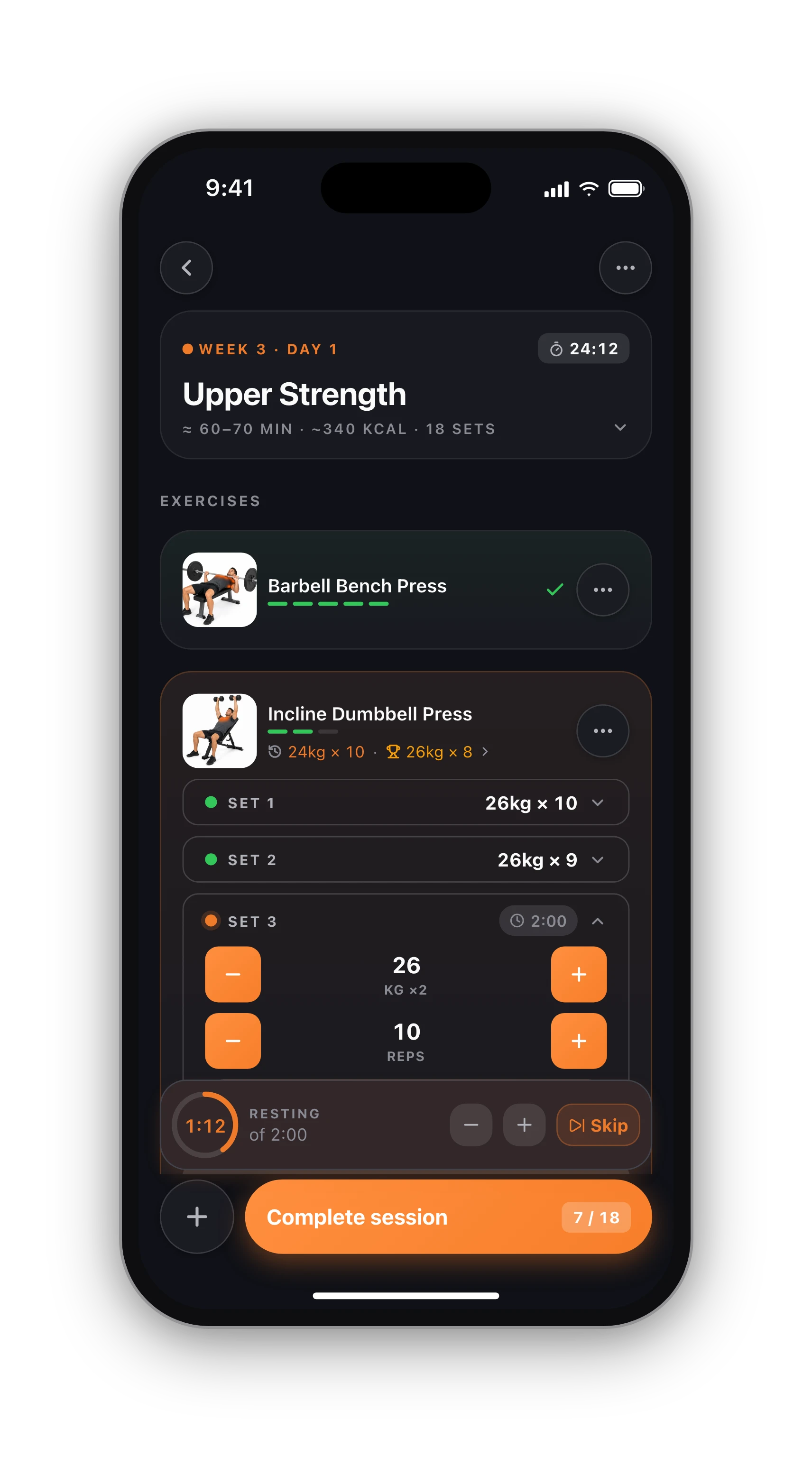
A workout tracker earns its place on the gym floor or it gets deleted. In HyperBody the weight and reps are already filled in from your plan or your last session, so most sets are one tap to confirm and one tap to tick. Change a number with the keypad, add a set, swap an exercise, and keep going.
Under every exercise sits the line that matters most: your top set from last time and your best ever. That is the number to beat today, right where you are looking, not three screens away in a history tab.
- Weight × reps, timed sets (plank, wall sit) and bodyweight with added weight
- Warm-up, working, drop and to-failure sets
- Supersets that move you between exercises for you
- Notes per exercise, so you remember the seat height
A rest timer that follows you.
Tick a set and the rest countdown starts. Lock your phone and it keeps running on the lock screen and in the Dynamic Island, with the current exercise and set beside it. Wear an Apple Watch and the same countdown is on your wrist, with your heart rate.
Each exercise keeps its own rest time, and you can set a longer rest for a heavy top set than for the back-off sets after it. See supersets and rest per set.
Every record, every chart.
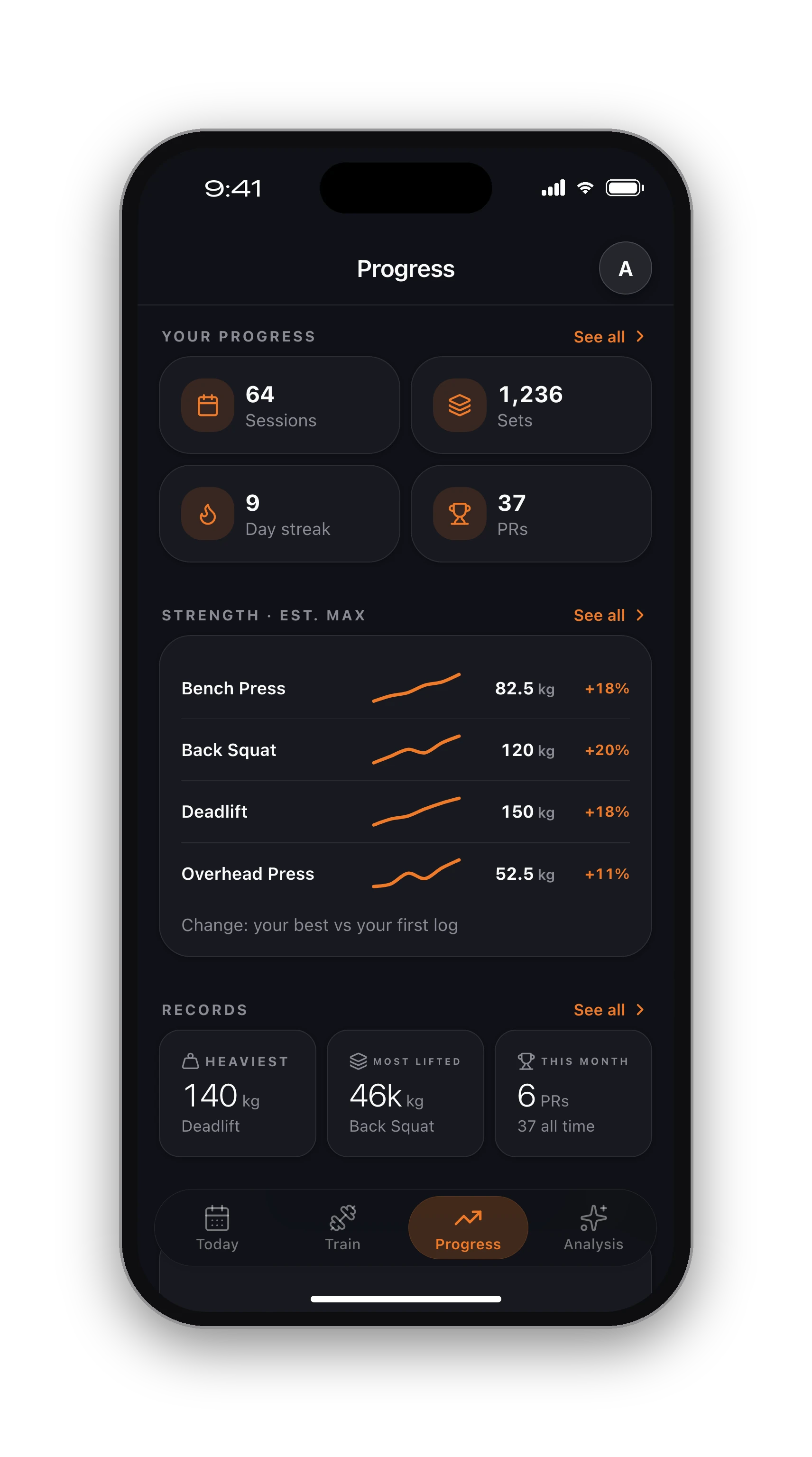
When you finish, the summary lists each new record and how much you beat the old one by. Every exercise keeps its own history and records, and the Progress tab charts your estimated one-rep max and weekly volume over weeks and months.
That is the whole point of tracking: knowing, not guessing, whether you are getting stronger. Read more on tracking personal records and progressive overload.
A program when you need one.
Not sure what to do today? Eight complete programs are built in and free: full body 3 days, push pull legs, upper lower, dumbbell only, bodyweight at home and more. Pick one and it lands on your calendar with every set and rep filled in.
Prefer your own? Build routines once and reuse them every week. Want a plan built around you instead? That is the AI workout planner.
Works with what you already use.
Your workouts go to Apple Health on iPhone and Health Connect on Android, and you can send every session to Strava automatically. The Apple Watch app runs a real workout session, so heart rate is recorded densely enough to mean something.
- Apple Watch: current set, rest countdown and heart rate on your wrist
- Android: Health Connect sync and a native Android app
- Strava: lifting sessions on your feed next to your runs
Just a tracker, if that's all you want.
HyperBody is also known for its AI physique scan, and it is entirely optional. You can use the app only to log your training, forever, without uploading a single photo. The scan, the AI plan and form check are there if you ever want them.
From download to first logged set.
01
Get the app
Free on iPhone and Android. Sign up with Apple, Google or email. No card.
02
Pick a program or start empty
Choose one of the 8 programs, build your own routine, or open an empty session and add exercises as you go.
03
Log, rest, repeat
Tick each set, let the rest timer run, and finish to see your records and the session on your calendar.
Know what's free before you sign up.
Free, with no time limit
Log every workout, build your own routines, follow the 8 ready programs, and keep your full history, records and charts. No card needed.
What Pro adds
An AI training plan that adapts to what you lift, full physique reports from photos, form checks inside the app and AI recipes. Trial included.
Straight answers.
Yes. Logging workouts, building routines, following the 8 ready programs and keeping your full history, records and charts are free with no time limit and no card. Pro adds an AI training plan, physique reports from photos, form checks in the app and recipes.
Speed on the gym floor, your last numbers in front of you while you lift, a rest timer you do not have to babysit, and charts that show whether you are actually progressing. HyperBody is built around those four, with programs for the days you do not want to plan.
Yes. Build a routine once with its exercises, sets, reps, rest and supersets, then reuse it every week or arrange several into a weekly program. You can also start an empty session and add exercises as you train.
Yes. Each exercise keeps its best weight, best estimated one-rep max and best set, and the workout summary lists every record you beat with the margin. The Progress tab charts your estimated max and weekly volume over time.
Yes. The Apple Watch app shows the current exercise, set and rest countdown, records your heart rate through a real workout session, and stays in sync with the phone. On iPhone the session also runs as a Live Activity on the lock screen.
Yes. Many people use HyperBody only as a gym log. The physique scan, the AI plan and form check are optional extras; nothing in the tracker needs them and you never have to upload a photo.
Keep going.
Free workout programs
Eight complete programs with every set and rep listed.
OpenWhat is free, exactly
The full list, and what Pro adds on top.
OpenPrefer paper?
A free printable workout log and a spreadsheet template.
OpenHyperBody vs Hevy
An honest side-by-side with the most popular tracker.
OpenHyperBody vs Strong
Where Strong is better, and where we are.
OpenBest workout tracker apps
Hevy, Strong and the alternatives, compared.
OpeniPhone, Apple Watch and Android.
HyperBody runs on iPhone with an Apple Watch app, and on Android. Your workouts, programs and records follow your account, and the web app shows the same data.


Your next workout, logged.
Free on iPhone and Android. Pick a program or start empty.
Start tracking free