Progressive overload app
Progressive overload,without the guesswork.
You know the rule: do a little more than last time. The hard part is remembering what last time was. HyperBody shows it under every exercise, updates your coming weeks when you beat the plan, and charts every lift so you can see the climb.
Free · iPhone and Android

Last time
Under every exercise
Auto
Plan updates, if you want them
Charts
Per lift, over months
Free
To log and track
Progressive overload in one paragraph.
Muscles and strength grow when you ask a little more of them over time: one more rep, a little more weight, an extra set, at the same good form. Most people do not stall because they lack effort; they stall because they cannot remember whether they did 8 or 10 reps last week, so they repeat the same session for months. The simplest system that works is double progression: stay at one weight until you hit the top of your rep range on every set, then add weight and start again at the bottom. Which range to use depends on your goal; see rep ranges explained.
Last session, beside every set.
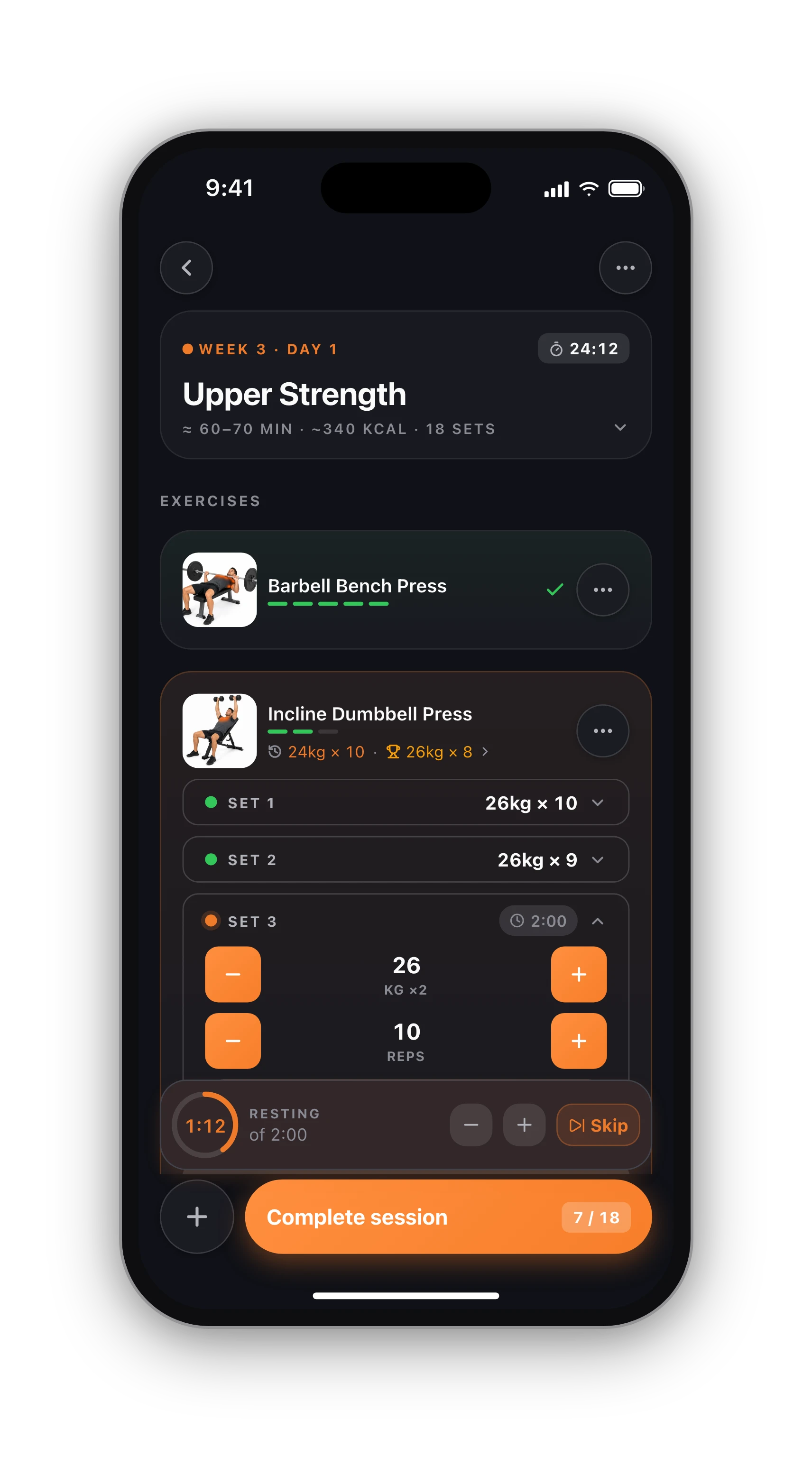
Under each exercise in a session sits one small line: your top set from the last time you did that movement, and your best ever. It works across plans and on your own routines, because it finds the last session by date, not by program week. That is your number to beat, right where you are looking.
When you finish the exercise, the line is replaced by a This session vs last comparison: your sets paired one by one with last time, a verdict on each, and the change in volume. Two seconds tells you whether today moved forward.
When you beat the plan, the plan follows.
On a program or a routine you built, the weights are yours, so the app asks before it changes anything. Lift differently from what was written and the end of the session asks once: Update coming weeks, Always update, or Keep my plan. Updating moves your later working sets by as much as you moved (110 kg against a planned 100 moves them up 10%), and the same weight for more reps moves the reps. Warm-ups are never touched, and the number of sets, their order and rest stay as you wrote them. Do exactly what was planned and nothing is asked.
On an AI plan, the coach does it for you. Inside a training block the weight holds while the reps climb (8, then 10, then 12), which is the overload. Beat the plan two sessions running and the next weeks get a weight step; fall clearly short and they come down at once, so you are never prescribed a weight you cannot lift. Deload weeks are lighter by design and never read as a bad day.
Proof it is working.
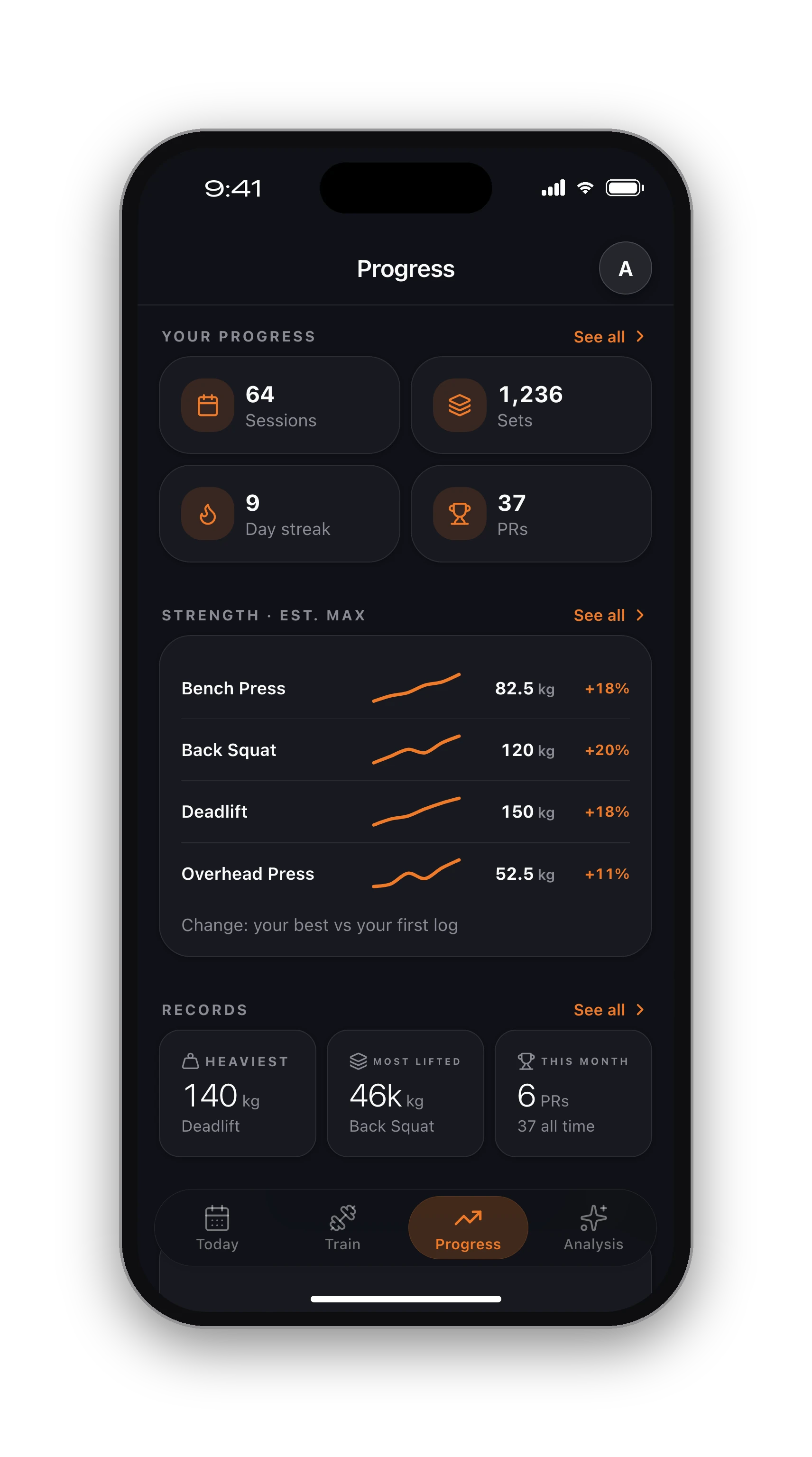
Overload is a promise you check over months, not sessions. Each exercise keeps its own history and records, the session summary lists every lift you beat with the margin, and the Progress tab charts your estimated one-rep max and weekly volume over time. If a line goes flat for weeks, that is your cue to change something; how to break a strength plateau covers what to try. More on records on the PR tracker page.
Overload, session after session.
01
Follow a plan
Pick one of the 8 free programs or build your own routine with your sets and rep ranges.
02
Beat the line
Each exercise shows last time's top set and your best. Aim for one more rep or a little more weight.
03
Let the plan move
When you lift more than planned, update the coming weeks in one tap, or set it to always update.
Know what's free before you sign up.
Free, with no time limit
Log every workout, build your own routines, follow the 8 ready programs, and keep your full history, records and charts. No card needed.
What Pro adds
An AI training plan that adapts to what you lift, full physique reports from photos, form checks inside the app and AI recipes. Trial included.
Straight answers.
Usually the smallest step your gym allows, and only once you hit the top of your rep range on every set. For most people that means about 2.5 kg on upper-body barbell lifts and 2.5 to 5 kg on squats and deadlifts. Beginners can add weight more often than advanced lifters.
A way to progress with two variables: reps first, then weight. You pick a range such as 8 to 12, add reps at the same weight until every set reaches 12, then add weight and drop back to 8. HyperBody's last-time line shows exactly where you are in that cycle.
One bad session is not a trend: sleep, food and stress all show up on the bar. Repeat the weight next time. If you miss on two or three sessions in a row, take the weight down about 5 to 10% and build back up, or take a lighter week.
On an AI plan, yes, when you lift clearly less than planned: the coming weeks drop to what you actually did, straight away. On your own plans and programs, nothing changes unless you choose Update coming weeks, so a single off day never rewrites your plan.
Yes. In Settings, the option for when you lift differently from your plan has three choices: Ask me, Always update and Never. With Ask me, the question only appears when what you did differed from the plan.
Keep going.
Double progression
The simplest way to progress your lifts.
OpenPR tracker
Every record, caught the moment it happens.
OpenStrength training tracker
Estimated 1RM, records and lift charts.
OpenFree programs
Eight programs with progression built in.
OpenRep ranges explained
Strength, hypertrophy and endurance ranges.
OpeniPhone, Apple Watch and Android.
HyperBody runs on iPhone with an Apple Watch app, and on Android. Your workouts, programs and records follow your account, and the web app shows the same data.


Know what to lift next time.
Free on iPhone and Android. Your last numbers, under every set.
Start free