Apple Watch workout app
Strength trainingon your Apple Watch.
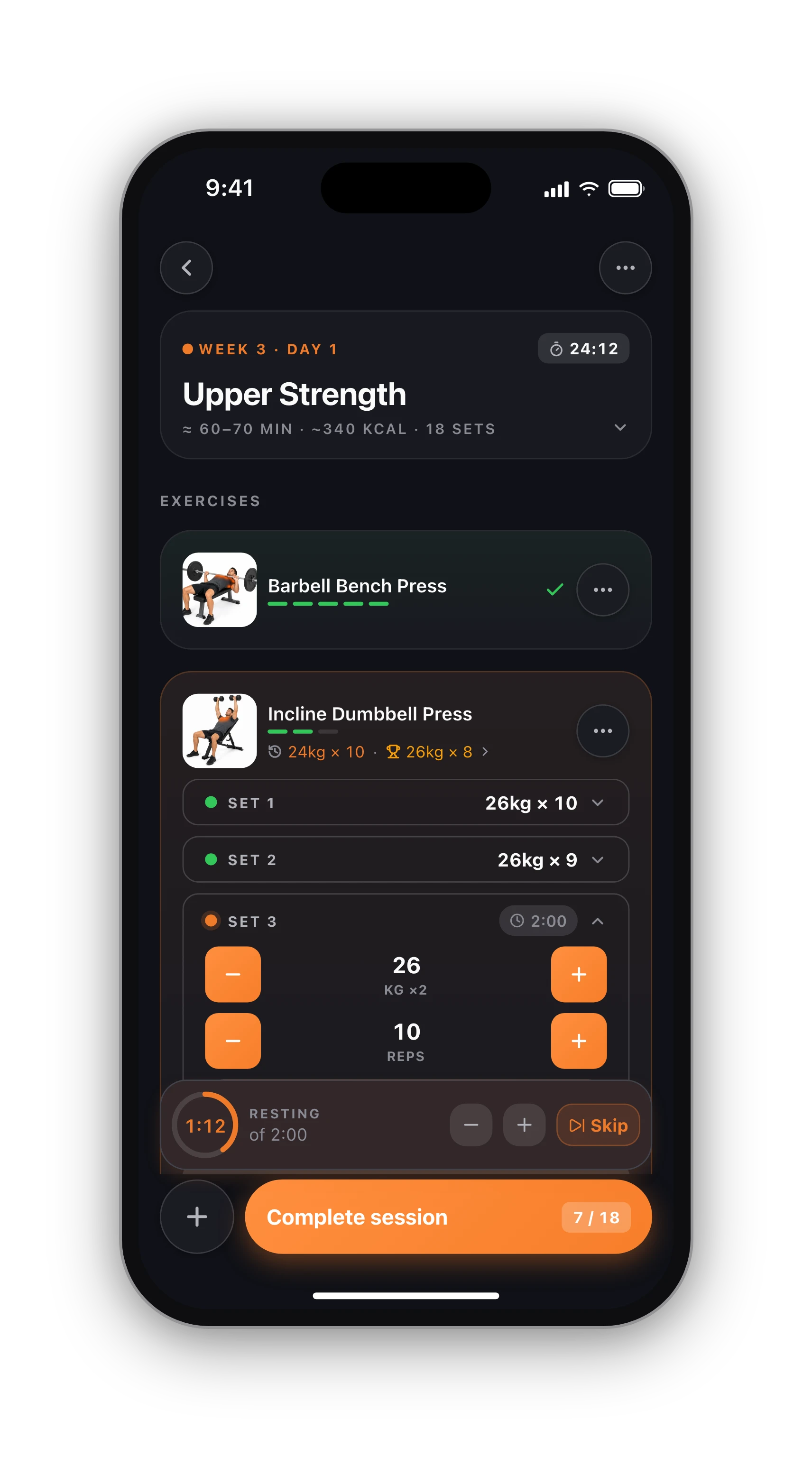
Apple's Workout app counts minutes and calories but knows nothing about sets and reps. HyperBody puts the exercise, the set, the rest countdown and your heart rate on your wrist, and the whole session on your lock screen.
Free · iPhone with Apple Watch
Wrist
Set, rest and heart rate
Live
Lock screen and Dynamic Island
Health
Apple Health sync
Free
Watch app included
What you see between sets.
Start a session on your iPhone and the watch app opens by itself. The wrist shows the exercise you are on, which set it is, and the rest countdown the moment you finish a set. Tick sets on the watch and they land on the phone, so your phone can stay in your bag or on the bench.
Before you train, the watch already knows what is next. Today's planned session (or the next one, with the day it is due) sits on the watch with a Start button, and in the Smart Stack. No plan today? Start an empty quick session from the wrist and the phone picks it up.
- Current exercise and set, with a tap to tick it
- Rest countdown that starts when you finish a set
- Live heart rate during the session
- Quick session from the watch, no plan needed
Heart rate that means something.
Many gym apps read whatever heart rate the watch happened to record in the background, which can be one reading every few minutes. HyperBody's watch app runs a real workout session, the same kind Apple's own Workout app uses, so the watch samples your heart rate densely for the whole time you lift.
When you finish, the session's heart-rate insight shows your heart-rate zones, calories and heart rate per exercise, on a chart you can scrub through minute by minute. Zones use your resting heart rate from Apple Health when it has one, and the highest heart rate it has ever recorded for you, not a 220-minus-age guess, when it can.
Your session on the lock screen.
While you train, the session runs as a Live Activity on the iPhone lock screen and in the Dynamic Island: elapsed time, current exercise, your target weight and reps, set progress and the rest countdown. You can glance at it without unlocking, and one tap takes you back into the session.
Start a workout on the watch and the Live Activity appears on the phone too, even if the app was closed (iOS 17.2 or later).
Apple Health, in both directions.
Connect Apple Health once in Settings, Connections. HyperBody can save each finished session to Health as a strength training workout, and reads back what makes the app smarter: your body weight from a smart scale, your resting and maximum heart rate, and the heart rate of each session.
Workouts you record elsewhere, a run or a ride from the watch's own app, for example, appear on your HyperBody calendar as activities, so your training week is complete in one place. Send it all to Strava too if you like.
Ready in a minute.
Install HyperBody on your iPhone and the watch app installs with it on your paired Apple Watch (any watch on watchOS 10 or later). Allow Apple Health access when asked. That is it: the next session you start on the phone opens on your wrist. Need something to follow? Pick one of the free programs and the watch shows each day's session as it comes up.
From iPhone to wrist.
01
Install on iPhone
Get HyperBody free from the App Store. The watch app comes with it on your paired Apple Watch.
02
Connect Apple Health
Allow Health access so your sessions are saved there and your heart rate and body weight come back.
03
Start a session
Start on the phone or the watch. Tick sets on either one, rest on the countdown, and see your heart-rate insight at the end.
Know what's free before you sign up.
Free, with no time limit
Log every workout, build your own routines, follow the 8 ready programs, and keep your full history, records and charts. No card needed.
What Pro adds
An AI training plan that adapts to what you lift, full physique reports from photos, form checks inside the app and AI recipes. Trial included.
Straight answers.
It is the best way to use it, because the phone holds the full logging screen and the watch mirrors it. The watch keeps today's planned session and can start a quick session on its own, timing and recording your heart rate, and the phone catches up when it is back in reach.
Yes. If you have a session planned, the watch shows it with a Start button and in the Smart Stack. If not, start an empty quick session from the wrist. Either way the phone adopts the session and the lock screen card appears.
Yes, after the session. The heart-rate insight shows the calories Apple Health recorded for the workout, with your heart-rate zones and the heart rate of each exercise. When there is no watch data, the app shows an estimate from the session and your body weight where it can make one.
Any Apple Watch running watchOS 10 or later, paired with an iPhone that has HyperBody installed. The watch app is included with the iPhone app; there is nothing extra to buy or download separately.
Yes. You can tick each set on the wrist and it lands on the phone. To change a weight or rep count, the phone's keypad is quicker, and both stay in sync during the session.
Yes. The watch app, the rest countdown, the heart-rate insight and Apple Health sync are part of the free tracker. Pro adds AI features such as the adaptive training plan, but nothing on the watch needs it.
Keep going.
The workout tracker
Everything the tracker does on iPhone and Android.
OpenSupersets and rest per set
How the rest countdown handles supersets and top sets.
OpenLifting on Strava
Send each session to Strava, with heart rate.
OpenOn Android instead?
The same tracker with Health Connect.
OpenBest watch apps for lifting
How the options compare on the wrist.
OpenFree programs
Something to follow, day by day, on your watch.
OpeniPhone, Apple Watch and Android.
HyperBody runs on iPhone with an Apple Watch app, and on Android. Your workouts, programs and records follow your account, and the web app shows the same data.