


You think your squat is deep enough. Your training partner says it looks fine. Then you see the video — and you're hitting quarter reps at best. Welcome to the gap between how a lift feels and how it actually looks.
Filming your sets is one of the most powerful (and free) tools for improving your technique. But propping your phone against a water bottle and filming from a random angle isn't enough. The setup matters, the angle matters, and how you review the footage matters even more.
Why Film Your Lifts?
1. Proprioception lies Your body's sense of position (proprioception) is calibrated by habit, not accuracy. If you've been quarter-squatting for years, a half squat feels "deep." You need external feedback to override this miscalibration.
2. Coaches aren't always available Even if you have a coach, they're not watching every rep of every set. Self-filmed footage gives you (or your coach) objective data to work with between sessions.
3. Progress documentation Your squat with 135 lbs today versus your squat with 135 lbs in six months should look different — deeper, more controlled, more confident. Video captures technique progress that strength numbers alone don't show.
4. Injury prevention Form breakdowns that lead to injury often develop gradually. Regular filming catches small deviations (hip shift, knee cave, excessive lower back rounding) before they become problems.
Equipment Setup
You don't need expensive gear. You need consistency and the right angle.
Phone + Tripod (Recommended) A phone tripod (even a cheap $15 one) is the best investment for filming. It gives you:
- Consistent height and angle every session
- Hands-free setup so you don't need a training partner
- Stable footage without shake
Phone Against a Surface (Acceptable) If you don't have a tripod, lean your phone against a dumbbell, water bottle, or gym bag. Use slow-motion mode if available — it makes form review much easier.
Height Guidelines:
- For squats and deadlifts: hip height (roughly 3 feet from the floor)
- For bench press: slightly above bench level
- For overhead press: head height or slightly above
- For rows: hip height, angled slightly upward
Camera Angles by Exercise
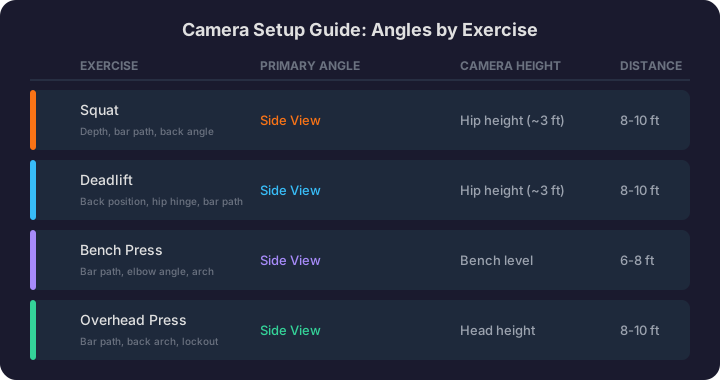
The angle you film from determines what information you capture. Different exercises need different views.
Squat
Primary angle: Side view (sagittal plane) This shows:
- Depth (are you hitting parallel or below?)
- Bar path (straight line vs. forward drift)
- Back angle (excessive forward lean?)
- Knee tracking relative to toes
- Hip hinge pattern
Set up the camera perpendicular to your body, at hip height, about 8-10 feet away. Make sure the entire range of motion (from standing to bottom position) fits in the frame.
Secondary angle: Front/45-degree view This shows:
- Knee cave (knees collapsing inward)
- Weight shift (favoring one side)
- Stance symmetry
Deadlift
Primary angle: Side view This shows:
- Back position (neutral spine vs. rounding)
- Hip hinge mechanics
- Bar path (should stay close to the body)
- Lockout position
- Starting position (hips too high or too low)
Secondary angle: Front view This shows:
- Symmetry (one side rising faster than the other)
- Grip width consistency
- Shoulder position relative to the bar
Bench Press
Primary angle: Side view (from head end or foot end) This shows:
- Bar path (slight diagonal from mid-chest to lockout)
- Elbow position (tuck angle)
- Arch maintenance
- Touch point on chest
Secondary angle: Head-on view This shows:
- Elbow flare
- Wrist position
- Bar evenness
Overhead Press
Primary angle: Side view This shows:
- Bar path (should be nearly vertical)
- Back hyperextension (excessive arching is common)
- Head position (moving forward as the bar passes)
- Lockout position overhead
How to Review Your Footage
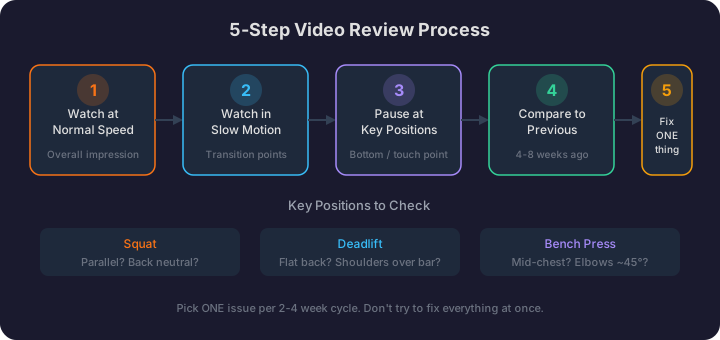
Filming is only half the equation. Most people film their sets and never watch them. Here's a structured review process:
Step 1: Watch at normal speed first Get an overall impression. Does the movement look smooth and controlled, or choppy and unstable?
Step 2: Watch in slow motion Most phones have a built-in slow-motion replay feature. Use it. Watch for:
- The transition points (bottom of squat, chest touch on bench) where form breakdowns typically occur
- Any sudden position changes that indicate a weak point in the range of motion
- Bar path deviations
Step 3: Pause at key positions For squats: pause at the bottom. Are you at or below parallel? Is your back neutral? For deadlifts: pause at the start. Is your back flat? Are your shoulders over or slightly ahead of the bar? For bench: pause at the touch. Is the bar on your mid-chest? Are your elbows at roughly 45 degrees?
Step 4: Compare to previous footage Pull up a video from 4-8 weeks ago. Same exercise, similar weight. What's changed? Is your depth better? Is your bar path straighter? Are the form breakdowns improving?
Step 5: Identify ONE thing to fix Don't try to overhaul everything at once. Pick the single most impactful form issue and focus on that for the next 2-4 weeks. Once it's improved, move to the next issue.
Common Filming Mistakes
Filming from too close If the camera is too close, you can't see the full range of motion. You need at least 6-8 feet of distance for full-body exercises.
Wrong height Filming from the floor makes squats look deeper than they are. Filming from overhead makes them look shallower. Hip height gives the most accurate perspective.
Only filming PR attempts Your form on a max effort set tells you one thing: how you perform under maximum stress. But most of your training is submaximal. Film your working sets — that's where you spend 90% of your training time and where form habits are built.
Never reviewing the footage The phone's camera roll is not a form review system. Set aside 5 minutes after each session to review your clips. Delete the ones that show good form; save the ones that reveal issues.
Using AI for Form Analysis
Self-review is valuable, but it has limitations. You might not know what "good" looks like for your body type, or you might miss subtle issues that an experienced eye would catch.
HyperBody's video form analysis takes this a step further. Upload a video of your set and receive rep-by-rep feedback on:
- Range of motion assessment
- Bar path analysis
- Common form deviations specific to that exercise
- Specific cues to address identified issues
This doesn't replace learning to self-assess — it accelerates the process by giving you objective, exercise-specific feedback that helps calibrate your own eye over time.
Building the Habit
Start by filming one exercise per session — your primary compound lift. That's 30 seconds of setup for valuable feedback. Once it's a habit, expand to 2-3 exercises.
Keep a "form library" folder on your phone. Save one good video per exercise every 4-6 weeks. Over time, you'll build a visual record of your technique progression that's as valuable as your strength numbers.
Your training log tells you what you lifted. Your video library shows you how you lifted it. Together, they give you the complete picture of your training quality — not just quantity.